Chart Example
SteelyORBFlow In Action
NinjaTrader 8 chart example. Other overlays may be visible alongside the featured indicator.
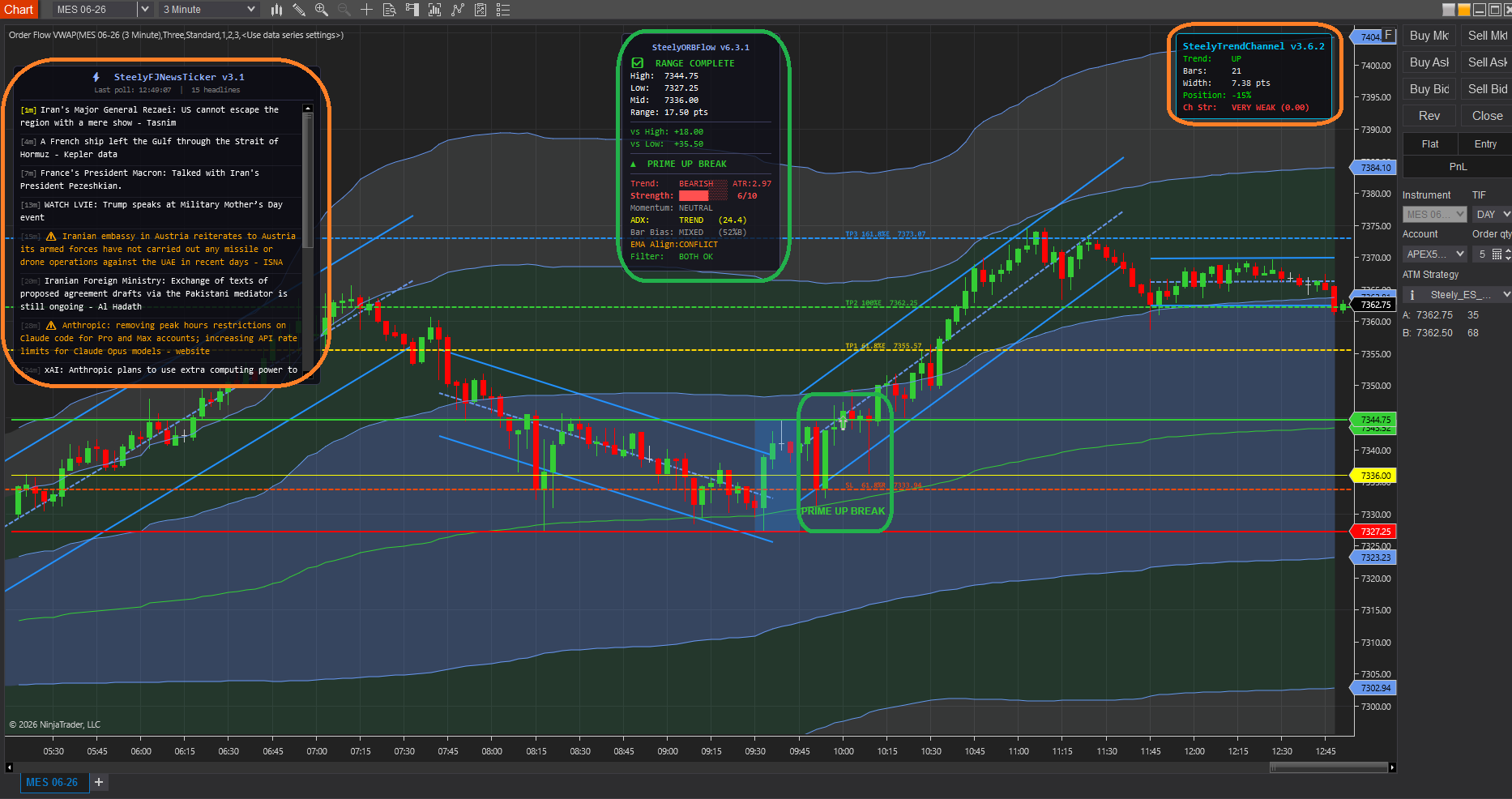
Captures the opening range, then watches for a clean breakout and grades it in real time. Instead of firing on every poke through the range, it runs a state machine that walks the session through clearly labeled phases — and only promotes a breakout to a PRIME signal when the structure earns it. When a break confirms, the projection levels and a live Strength Meter are already on the chart.
One-time Founders license License key and install guide by email within minutes 7-day refund if not activated License terms
NinjaTrader 8 chart example. Other overlays may be visible alongside the featured indicator.
Visible range-building, breakout, and re-arm states, with projections and a strength reading.
Keep in mind: The state sequence controls when markers appear. Limiting signals does not eliminate false breaks or losses.
The indicator moves through visible states, so where price sits in the session is always clear. Inside the range, the HUD also reads the live posture — Reclaim Low, Reject High, or Inside Range.
One quality signal per direction, an optional qualified second leg, and nothing else. The state machine is the product.
The opening range is the day's first agreement on value. The break of it is the day's first decision.
Most ORB tools fire the instant price crosses the line — and then fire again, and again, on every retest, until you've taken four trades on one move. The best ORB traders take one quality signal per direction and let it work.
SteelyORBFlow is built around that discipline. The state machine tells you when the range is still forming, when it's locked, when a break is PRIME, and when the chart has RE-ARMED for a legitimate second leg — not a retail re-entry.
Important Notice: This indicator is a non-customized charting tool provided for educational and informational market analysis only. It highlights conditions that meet proprietary analytical criteria and does not constitute financial advice, trading recommendations, or a solicitation to buy or sell any instrument. All signal output is analytical in nature. Users remain solely responsible for whether, when, and how they trade. Past performance of any analytical method is not indicative of future results.
Built for the trader who takes one quality signal per direction and lets it work — and who gets chopped up doing anything else.
The PRIME-then-RE-ARM architecture surfaces a single confirmed break per direction, so a move produces one decision rather than four.
The 0–10 meter blends trend, ATR, ADX, RSI, and EMA alignment, with posture readouts — Reclaim Low, Reject High, Inside Range — visible before the break.
RE-ARM only appears when EMA trend, a minimum-ADX floor, and optional Bar Bias all align — a legitimate continuation, not a retest re-entry.
What SteelyORBFlow needs to run, and exactly what happens after checkout.
NinjaTrader 8, version 8.1.x, on Windows. A live or sim market data connection in NinjaTrader 8. No other SteelySystems indicator is required — every tool runs standalone.
Yes — $159 one-time as a Standard-tier indicator. It is also included in the Complete Suite ($1,800, all twelve indicators — $2,224 bought one at a time).
Checkout runs through Whop. Your license key and install guide arrive by email, normally within minutes. Import the file in NinjaTrader 8 via Tools → Import NinjaScript Add-On, enter the key, and add the indicator to a chart. Email install support is included.
The license is per user. Install it on any desktop, laptop or VPS that you personally use for your own trading. Sharing the key or the files is not permitted — see the License Agreement.
A one-time Founders license with compatibility patches, workspace templates and install support, available through December 31, 2026. From January 1, 2027 new purchases move to a subscription model. Founders keep their one-time licenses and are not required to subscribe.
Yes, within 7 days of purchase if the license key has not been activated. Once a key is activated the sale is final — details on the Refund Policy page.
No. Every signal, level, score or panel is an analytical aid, not a trade instruction. The indicator organizes context; the decision, the risk and the outcome are yours. Read the full disclosure before use.
Yes. The Steely Custom Sounds pack is free with every indicator purchase.
SteelyORBFlow captures the opening range and walks the session through visible states — building, locked, PRIME, re-armed — promoting a break only when the structure earns it. One clean signal per direction, with the levels and strength meter already drawn.
One-time Founders license License key and install guide by email within minutes 7-day refund if not activated License terms