All Loaded History
Once the chart finishes loading, every bar it holds goes into one file. How far back that reaches is set by the chart's Days to load and by what your data provider supplies.
NinjaTrader 8 Utility · Chart Bars to CSV · ET + Chart Time · Any Instrument
Ever wanted to hand your candle data to your AI of choice and have it analyze the market? That’s what SteelyBarExporter does. It saves your chart’s bars to a CSV file you can use however you please: deep personal analysis, data-science work, or letting your favorite LLM do some modeling for you.
Coming with the v11.2 global release on November 20, 2026 $99 one-time license, never a subscription 7-day refund if not activated License terms One-page guide (PDF)
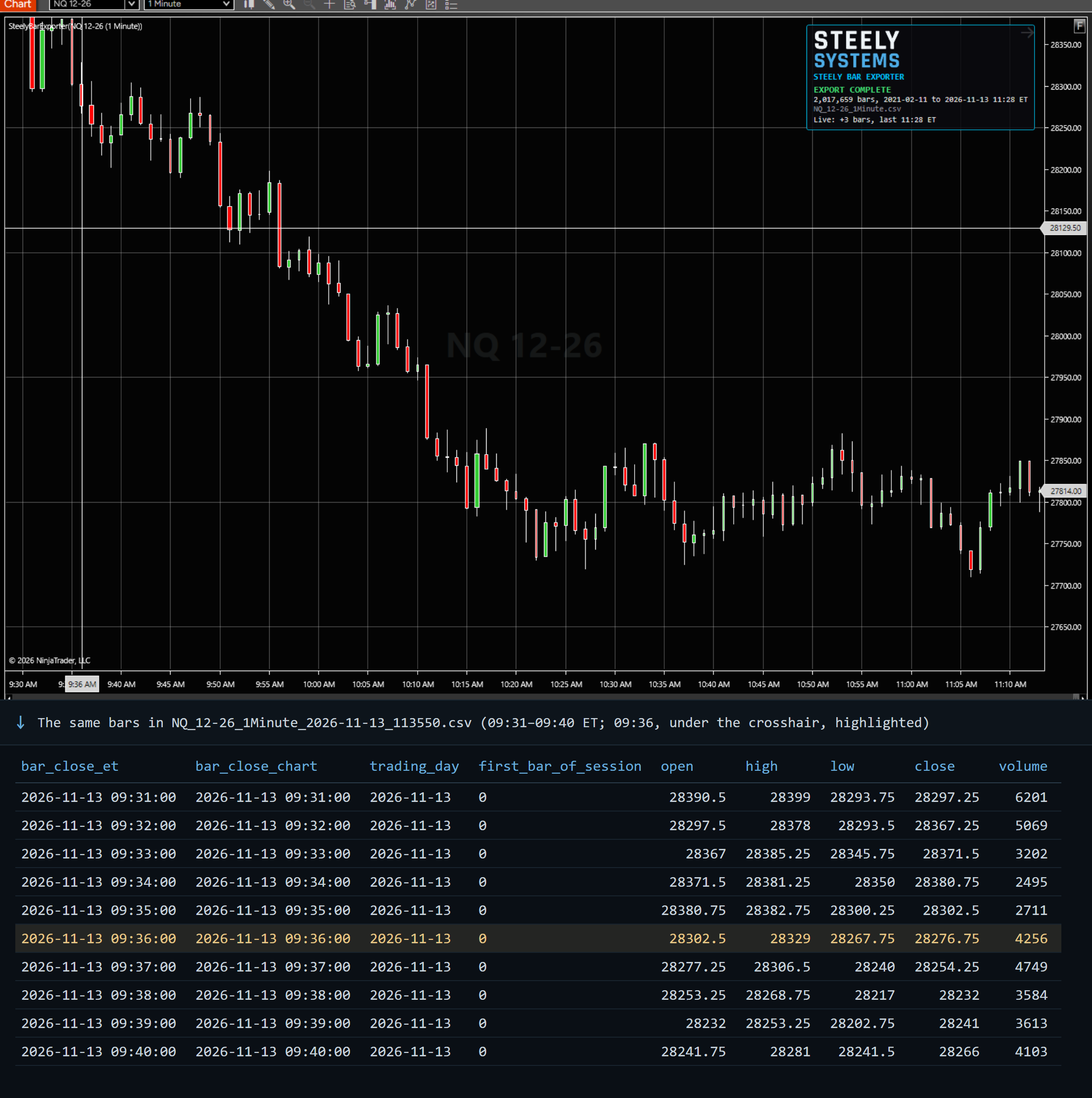 Click to enlarge
What SteelyBarExporter does on a NinjaTrader 8 chart.
Once the chart finishes loading, every bar it holds goes into one file. How far back that reaches is set by the chart's Days to load and by what your data provider supplies.
On by default: while the chart stays open, each new bar is added to the same file as it closes. Turn it off for a one-time snapshot.
Every row has the bar's close time in Eastern Time and in your chart's time, so files from machines in different time zones line up.
The trading day each bar belongs to under the chart's trading hours, so an evening Globex bar counts toward the next day, and a 1 on the first bar of each session.
Named by instrument, bar period and the Eastern time the chart loaded, for example MNQ_12-26_1Minute_2026-11-13_112530.csv, in Documents\NinjaTrader 8\SteelyExports or a folder you choose. Turn the time stamp off for one file per series instead.
A small Steely HUD with the export’s progress, bar count and file, which you can move or switch off. No signals, no alerts and no orders.
One header row, then one row per bar, oldest first. Plain comma-separated text with no extra formatting, ready for any tool that reads CSV.
bar_close_et,bar_close_chart,trading_day,first_bar_of_session,open,high,low,close,volume2026-11-11 16:59:00,2026-11-11 16:59:00,2026-11-11,0,28428.5,28440.5,28424.5,28426.25,9972026-11-11 17:00:00,2026-11-11 17:00:00,2026-11-11,0,28427,28454.5,28424.75,28445,12592026-11-11 18:01:00,2026-11-11 18:01:00,2026-11-12,1,28307.5,28307.5,28157,28236.25,65932026-11-11 18:02:00,2026-11-11 18:02:00,2026-11-12,0,28238,28275.5,28220,28269.5,52252026-11-11 18:03:00,2026-11-11 18:03:00,2026-11-12,0,28269.25,28323.25,28266.25,28269.75,4910
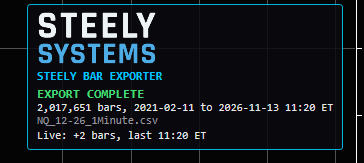
yyyy-MM-dd HH:mm:ss, decimal points, no thousands separatorsA small Steely HUD shows EXPORTING… while history is written, then EXPORT COMPLETE with the bar count, the first and last bar and the file, plus a line for each bar added live. If nothing could be written, it says NOT WRITTEN and why. Drag it anywhere (double-click puts it back), or switch it off.
It holds the bars NinjaTrader has loaded on that chart, from your own data connection, and nothing else.
Keep in mind: Gaps or errors in the chart's history carry into the file. Each full chart load writes a new, time-stamped file, so delete old exports you no longer need. Times are to the second, so on tick, volume or range charts several bars can share one time stamp. Excel can block new rows while it has the file open.
AI assistants, notebooks and spreadsheets can all read a CSV file. Getting your own candle data out of NinjaTrader to give them usually means copying by hand or writing your own NinjaScript.
SteelyBarExporter does that job: add it to a chart and its bars land in a CSV file, with the session details already worked out. Close times come in Eastern Time as well as your chart’s time, each bar is tagged with its trading day, and the first bar of every session is flagged, so an AI model or a script reads the sessions correctly.
It is a utility, not an indicator: it draws nothing on price and gives no signals. What you, or the AI you hand the file to, make of the data is yours.
Important Notice: SteelyBarExporter is a non-customized data utility provided for educational and informational market analysis only. It copies bar data from your NinjaTrader 8 chart to a file and does not generate signals, constitute financial advice or trading recommendations, or solicit the purchase or sale of any instrument. Data accuracy depends on your data provider and NinjaTrader's stored history. Any analysis of the file, including output from AI tools, is not advice from Steely Systems. Users remain solely responsible for whether, when, and how they trade. Educational and informational only; not a recommendation to buy or sell.
For traders who want their own candle data outside NinjaTrader, for an AI, a script or a spreadsheet.
Upload the file to the AI assistant you use and ask it to describe ranges, session behavior or patterns, or to build a model from the bars.
Load it into pandas, R or a notebook. The trading-day column and the session flag split the rows by session without any time-zone arithmetic.
Open it in Excel or keep a growing archive: with live append on, the file stays current while the chart is open.
SteelyBarExporter arrives with the v11.2 global release of the Steely indicators on November 20, 2026, and purchases open that day: $99 one-time. Want a utility that doesn’t exist yet? Request one.
NinjaTrader 8, version 8.1.x, on Windows, and a chart with bars loaded from your NinjaTrader 8 data connection. No other SteelySystems tool is required.
No. SteelyBarExporter is a utility, sold on its own for $99 one-time. Utilities are not included in any bundle, including the Complete Suite.
No. From January 1, 2027 new indicator purchases move to a subscription model, but utilities stay one-time purchases.
Whatever the chart has loaded: the chart's Days to load setting and your data provider's history decide how far back it goes. To export more, load more days on the chart; each load writes a new file.
Yes. Each file name includes the time its chart loaded, so two charts with the same instrument and period, such as an overnight and a day-session chart of MNQ 1-minute, write separate files. If you turn Timestamp in file name off, they would share one file; give each chart its own output folder then.
Yes. Times are to the second, so bars that close within the same second share a time stamp; the rows stay in order.
Checkout runs through Whop. Your license key and the download appear at whop.com/steelysystems (sign in with your checkout email), normally within minutes; the Install guide there walks through setup. Import the file in NinjaTrader 8 via Tools → Import NinjaScript Add-On, enter the key, and add SteelyBarExporter to a chart. Email install support is included.
The license is per user. Install it on any desktop, laptop or VPS that you personally use for your own trading. Sharing the key or the files is not permitted — see the License Agreement.
Yes, within 7 days of purchase if the license key has not been activated. Once a key is activated the sale is final — details on the Refund Policy page.
No. It copies bar data to a file and nothing else: no signals, no alerts and no orders. What you do with the data, and every trading decision, is yours. Read the full disclosure before use.
Yes, heavily, and on purpose. We use leading AI models and our own custom AI tooling in modeling, analysis and development, including the research behind the DI Briefs and Steely MAGE. AI doesn't generate trade signals and doesn't place trades. The indicators run rules we designed and can show on your chart. Everything is tested in simulation and in our own trading before it ships.
SteelyBarExporter is the first Steely utility, and more are on the way. Every utility is $99 one-time, never a subscription. Have an idea for one, or a design of your own? Tell us what you would like built.
Your candle data in a CSV file, ready for your AI of choice, your scripts or your spreadsheets. SteelyBarExporter keeps it current while the chart is open and works out the time zones and trading days for you.
Coming with the v11.2 global release on November 20, 2026 $99 one-time license, never a subscription 7-day refund if not activated License terms One-page guide (PDF)